Tech Talks
How Smart Access Control Can Transform Your Workflow
Swift Struck
4 min read
Apr 14, 2026
Most businesses don’t break because of bad people.
They break because everyone has access to everything.
One person edits the wrong data.
Another deletes something important.
Someone else sees information they shouldn’t.
A team member gets lost inside features they don’t even need.
That’s where Roles & Permissions become one of the most valuable features for building a serious custom app, internal tool, or scalable SaaS platform.
At Swift Struck, we use this feature often to turn messy operations into clean, controlled workflows.
What Are Roles & Permissions?
In simple words:
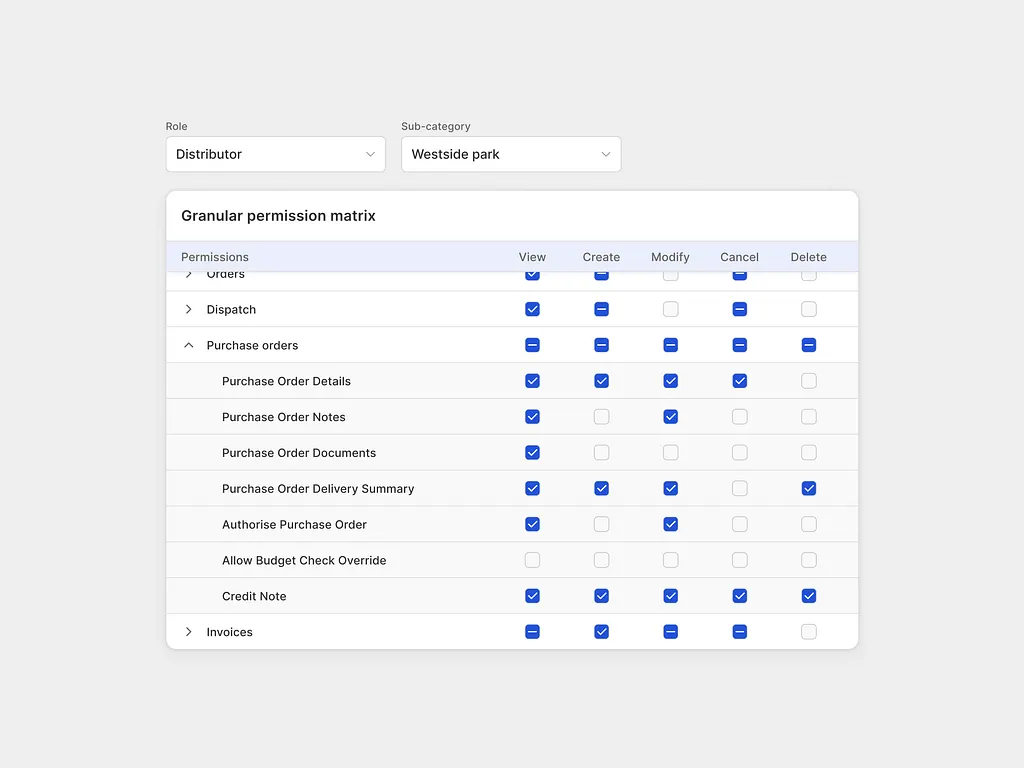
Roles let you decide:
Who can read
Who can view
Who can edit
Who can delete
Who can approve actions
Who can access specific data
Who can see specific screens or features
Instead of giving every user the same experience, you can create different experiences for different people.
For example:
Admin → Full control (read, edit, delete, manage users)
Manager → Team visibility + approvals
Staff → Only view and update daily tasks
Client → Only view their own data
Finance → Reports + invoices only
Same app. Different experience.
That’s how modern business workflow software should work.
Permissions Can Change as Your Team Changes
One of the biggest advantages of a well-built Glide app is flexibility.
Access rights are not fixed forever.
If someone currently has edit access, but later should only read and view data, an admin can update their permissions.
If a team member gets promoted and needs approvals access, that can be added too.
If someone changes departments, their entire app experience can be adjusted.
That means your system grows with your business — without rebuilding the app every time roles change.
Instead of creating confusion, the app stays aligned with how your team actually works.
Why This Feature Is So Powerful
Many businesses still run on:
WhatsApp messages
Shared spreadsheets
Manual approvals
Constant follow-ups
“Can you send me that file?”
“Who changed this?”
“Who deleted this?”
When everyone depends on everyone else, work slows down.
With a properly built business app, roles remove that chaos.
Each person enters the app and instantly sees only what matters to them — with only the permissions they need.
Less confusion.
Less training.
Less mistakes.
Better control.
Faster execution.
Real Example: Inventory Business
Imagine a retail business with stores, warehouse staff, sales teams, and management.
Without permissions:
Sales edits stock accidentally
Staff deletes a product row
Warehouse sees finance reports
Managers chase updates manually
Everyone asks everyone
With Roles & Permissions:
Sales Team Can:
View available stock
Search products
Generate PDF catalog
Update customer follow-ups
Warehouse Team Can:
View inventory queue
Edit stock in / stock out
Manage dispatch status
Management Can:
View dashboards
Read performance reports
Approve transfers
Compare branch performance
Finance Can:
View revenue reports
Edit payment status
Access margins
One platform. Clear responsibilities.
That’s the power of a well-designed custom business app.
Better Security Without Complexity
Permissions aren’t only about convenience. They’re also about protection.
Sensitive data like:
Revenue numbers
Customer details
Internal notes
Pricing logic
Team performance
…shouldn’t be visible to everyone.
With the right setup, access can be configured so the right people can read or edit data, while others only view what they need. Some users may not even know certain data exists.
That means your app stays clean, private, and scalable.
How We Apply This in Real Business Apps
At Swift Struck, role-based systems are not an extra feature we add later.
They’re part of how we design apps from day one.
When we build apps for operations, inventory, approvals, internal tools, or scalable SaaS products, we structure every workflow around the right level of access.
That means:
Teams only see what’s relevant
Managers get clarity without micromanaging
Sensitive data stays protected
Actions stay controlled
Workflows move faster
The result is an app that feels simpler for users — and far more powerful for the business behind it.
Because great systems aren’t built by adding more screens.
They’re built by giving the right people the right tools.
The Real Opportunity
If your team still depends on memory, messages, and manual approvals…
You may not need more staff.
You may need a better system.
And often, it starts with the right person having the right level of access — to read, view, edit, delete, or have those permissions changed as the business evolves.
Build a System That Actually Work
If you're exploring a custom app, internal tool, workflow automation system, or scalable SaaS product, Swift Struck can help you turn messy processes into a clean system built for how your business actually runs.